Need 100% Marketplace-Compliant Background Removal in Bulk?
Send us your product catalog for a free 45-minute sample test edit with pure white RGB (255,255,255) guarantee.
Professional background removal for e-commerce product photos is the precision post-production process of isolating a product from its original capture setting using hand-drawn vector clipping paths or advanced alpha channel masks. Whether you sell on Amazon, eBay, Shopify, or Walmart, clean product cutouts eliminate distracting clutter, ensure 100% compliance with strict marketplace standards (such as pure white RGB 255, 255, 255), and dramatically lift customer conversion rates. In this definitive studio guide written by senior commercial retouchers, you will learn the exact techniques, edge-refinement workflows, tool comparisons, and quality assurance protocols needed to produce flawless commercial cutouts.
What Is Background Removal in Commercial Post-Production?
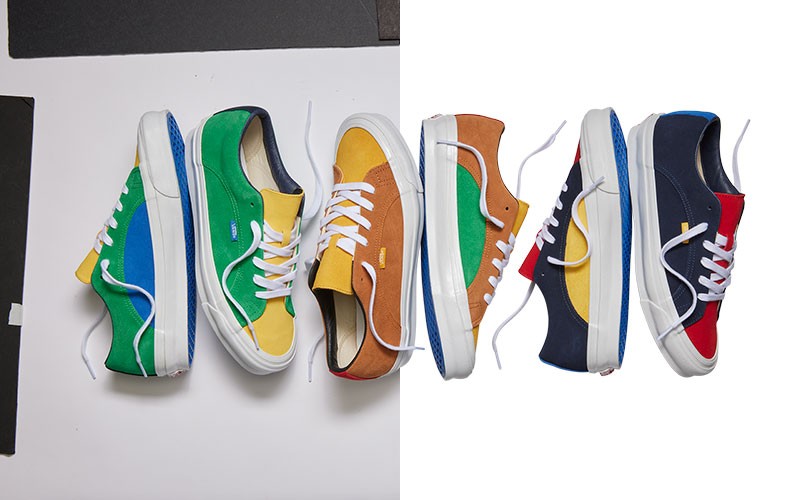
In high-volume commercial photography, background removal—also referred to as deep etching, image cutout, or background knockout—is the technical extraction of a subject from its background layer so the item can be placed on pure white, a transparent canvas, or branded lifestyle scenes.
Unlike casual mobile apps that apply aggressive edge blurring, commercial e-commerce requires sub-pixel fidelity. Every edge, bevel, contour, and drop shadow must remain crisp and mathematically accurate. This ensures that when a shopper zooms in at 200% on a laptop, smartphone, or tablet, the product outline appears natural, razor-sharp, and free of jagged pixelation or discolored halo artifacts.
Why Background Removal Matters for E-Commerce & Marketplaces
Product images are the single most influential conversion factor in online retail. Online buyers cannot touch, wear, or physically test merchandise; their entire buying decision hinges on visual fidelity. Leading global platforms enforce rigid image specifications to maintain catalog consistency across millions of product listings.
1. Amazon Product Image Requirements
Amazon’s algorithmic listing policy strictly mandates that the main hero image (MAIN) of every product listing must meet uncompromising specifications:
- Pure White Background: The background must be pure white with an exact color code of RGB (255, 255, 255) or Hex
#FFFFFF. Any tint—even RGB (254, 254, 254)—can trigger automated listing suppression. - Frame Coverage: The isolated product must occupy at least 85% of the total image canvas frame area.
- Zoom Activation: Files must measure at least 1,000 pixels (optimally 1,600 to 2,560 pixels) on the longest dimension to enable Amazon's high-resolution interactive mouse-hover zoom.
- Exclusions: No promotional text, badges, watermarks, colored borders, or packaging not included with the product may appear on the primary hero image.
2. eBay Photo Quality Requirements
eBay search algorithms reward listings with clean visual presentation and high buyer engagement:
- High-Resolution Dimensions: eBay recommends a minimum size of 1,600 pixels on the longest side to trigger the 2x-3x magnifying zoom tool.
- Neutral, Distraction-Free Backdrop: While eBay allows soft off-white or light gray backdrops on secondary images, pure white cutouts rank higher in organic search filters.
- Prohibition of Borders & Text: eBay disallows seller-added borders, marketing text, and overlaid logos.
3. Shopify, WooCommerce & Direct-to-Consumer (DTC) Stores
For independent DTC brands on Shopify or WooCommerce, background removal provides visual consistency across collection grids. Transparent PNGs and modern WebP assets allow you to switch background palette tones seasonally without re-shooting your entire inventory.
Clipping Path vs. Image Masking vs. AI Background Removal
Selecting the appropriate technical method for your inventory type is critical for balancing turnaround speed, budget, and image quality. The three primary methods used in professional studios are:
| Method | Best Used For | Edge Precision | Speed / Volume | Relative Cost | Key Limitations |
|---|---|---|---|---|---|
| Vector Clipping Path (Photoshop Pen Tool) | Hard, sharp, or solid surfaces: shoes, electronics, watches, handbags, bottles, cookware. | 100% mathematically exact (Resolution-independent vector Bézier curves). | 15–35 min/image (Manual human craft). | Standard ($0.39 – $1.99) | Ineffective for fine hair, fur, semi-transparent mesh, or liquid splashes. |
| Alpha Channel Image Masking | Complex, soft edges: human model hair, fur collars, feather trims, sheer apparel, transparent glass. | Micro-strand fidelity (Pixel-level alpha transparency & luminosity channels). | 20–50 min/image (Channel calculation & hand refinement). | Intermediate ($1.25 – $4.50) | Requires high-contrast source capture and experienced colorists. |
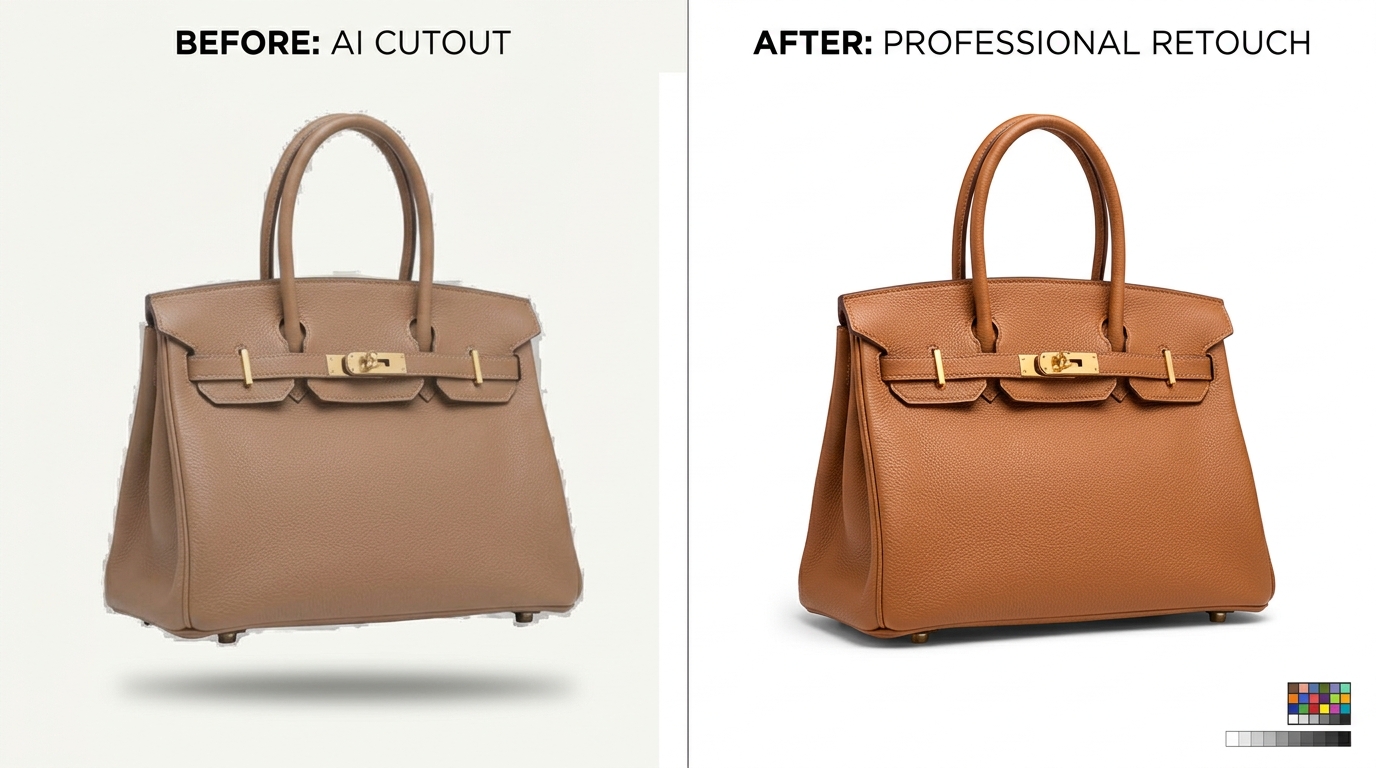
| AI Background Removers (Machine Learning Models) | Quick blog graphics, rough mockups, non-commercial drafts, low-contrast previews. | Approximate / Soft (Prone to halo fringing, blurred corners, erased edges). | Instant (2–5 seconds/image). | Low subscription fee | Consistently fails on reflective metals, transparent glass, and fine textures; unacceptable for Amazon hero standards. |
Step-by-Step Professional Background Removal Workflow
At Dinamico Studio, our production artists adhere to a non-destructive 5-step workflow on every commercial catalog project:
Step 1: Inspecting the Raw File & Subject Selection
Open the high-resolution RAW or 16-bit TIFF image in Adobe Photoshop. Zoom into 300% to examine edge transitions, surface reflections, and contact shadow density. Determine whether the object requires a closed vector clipping path, an alpha channel mask, or a hybrid combination.
Step 2: Drawing the Hand-Crafted Vector Path
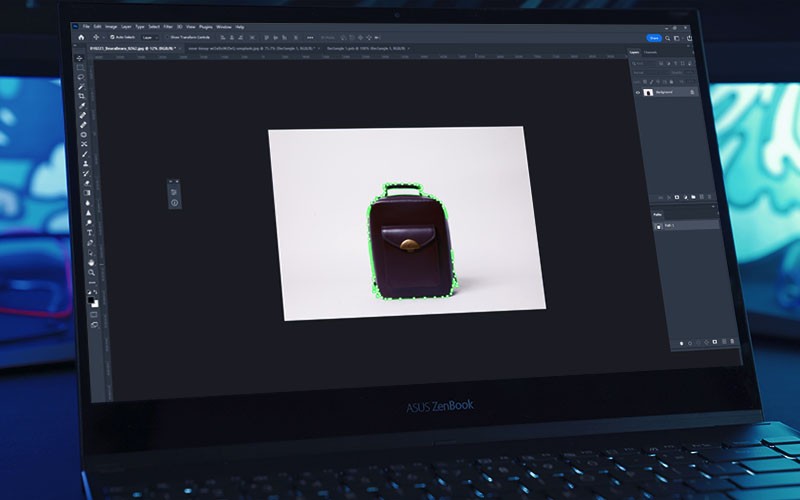
Select the Photoshop Pen Tool (P) in "Path" mode. Avoid the Magnetic Lasso or Quick Selection tools, which create micro-aliased, stepped boundaries.
Studio Best Practice: Position all vector anchor points exactly 0.5 pixels inside the outer contour of the subject. Drawing slightly within the boundary ensures that zero trace of the original colored background bleeds into the new pure white canvas.
Step 3: Refining Complex Edges, Hair & Transparency
For apparel with frayed edges, model portraits, or fur trims:
- Separate the color channels (Red, Green, Blue) to locate the channel offering the highest contrast between the subject and background.
- Duplicate the high-contrast channel and apply
Levels (Ctrl+L)orCurves (Ctrl+M)to crush the background to solid white and silhouette the subject into pure black. - Use a soft Dodge/Burn brush to isolate individual hair strands, then load the channel as a live Alpha Selection Mask.
- Apply Photoshop's
Decontaminate Colorsfeature to neutralize background color cast from bounce lighting.
Step 4: Preserving Natural Contact & Cast Shadows
A product floating on sterile white looks unnatural and untrustworthy. Professional retouchers duplicate the original ground shadow layer, set the blend mode to Multiply, and gently mask away the surrounding floor artifacts. If the original lighting created poor shadows, an expert retoucher hand-builds a realistic multi-layered drop shadow or reflection.
Step 5: Exporting & Color Profiling
Convert the working color space to sRGB IEC61966-2.1 to prevent color shifts across web browsers and mobile screens. Embed the vector path into the saved file format (TIFF or PSD for studio archiving; optimized JPEG or WebP for website deployment).
Processing a Large E-Commerce Inventory?
Don't let manual clipping paths bottleneck your studio launch. Dinamico Studio provides hand-drawn clipping paths and background knockout services with 45-minute rush turnaround, starting at just $0.39/image.
Explore Background Removal Services »Tool Comparison: Photoshop vs. GIMP vs. AI vs. Studio Outsourcing
Different tools cater to different volume requirements and skill levels. Here is how the top options stack up for commercial operations:
| Platform | Learning Curve | Batch Capability | Output Quality | Best Recommendation |
|---|---|---|---|---|
| Adobe Photoshop CC | High (Professional) | Automated with Actions / Scripts | Studio Grade (10/10) | The industry gold standard for in-house creative directors and professional retouchers. |
| GIMP (Open Source) | Moderate | Limited batch handling | Good (7/10) | Budget-conscious freelancers needing basic path tools without a monthly Adobe Creative Cloud fee. |
| Automated AI Tools | None (One-click) | API Available | Inconsistent (5/10) | Social media mockups, rapid concept testing, and non-retail imagery. |
| Dedicated Retouching Studio | Zero (Fully Managed) | Unlimited (5,000+ images/day) | Flawless 100% Studio QA (10/10) | Best for Amazon sellers, apparel brands, and photography studios scaling catalog production. |
The 3-Point Studio QA Checklist for Flawless Cutouts
Before delivering any product image to a commercial client, professional retouchers execute an uncompromising quality assurance test:
- The 3-Color Plate Inspection: Create three solid adjustment fill layers beneath your isolated subject: 100% Pure Black (RGB 0,0,0), 50% Neutral Gray (RGB 128,128,128), and 100% Pure White (RGB 255,255,255). Toggle through each plate. Halos and color fringing that remain invisible on white will instantly stand out against black.
- Anti-Aliasing Check: Zoom to 400% on high-contrast curves. Check for stair-stepped, jagged rasterization. A properly drawn Bézier curve should have a smooth 0.3px to 0.5px sub-pixel anti-aliased edge.
- Interior Hole Cutouts: Inspect handles, straps, buckles, and hollow cavities (such as shoe eyelets or handbag loops). Ensure interior negative spaces are fully excised rather than left white.
- Color Cast Neutralization: Check white or silver product surfaces for colored bounce light from the original backdrop. Use an isolated selective color or desaturation adjustment layer on edges to neutralize contamination.
Common Background Removal Mistakes & How to Fix Them
-
Mistake 1: Relying on Magic Wand or Auto-Select.
The Fix: Automatic threshold tools latch onto high-contrast noise, leaving jagged borders. Always use the vector Pen Tool for hard goods or calculated luminosity channels for hair. -
Mistake 2: Erasing Pixels Directly (Destructive Editing).
The Fix: Never use the Eraser Tool. Always apply a Layer Mask. Layer masks preserve original source pixels so adjustments can be made without restarting the cutout from scratch. -
Mistake 3: Harsh, Cut-Out "Cardboard" Edges.
The Fix: Real physical objects interact with ambient light. Apply a tiny0.3px to 0.5px featherto hard vector paths to mimic realistic lens optics. -
Mistake 4: Omitting Product Contact Shadows.
The Fix: An item without a contact shadow appears to float in mid-air. Replicate natural lighting by preserving original cast shadows or drawing multi-density directional drop shadows.
Industry-Specific Background Removal Workflows
1. Jewelry & Luxury Accessories
Gemstones, diamonds, and polished gold/silver reflect everything in the photography room. Isolate metallic contours with multi-path vector cutouts. Apply specialized jewelry retouching to remove camera reflections and blemishes while keeping stones brilliant.
2. Apparel & Ghost Mannequin Photography
To showcase clothing fit without hiring live models, studios photograph garments on a physical mannequin, then capture a secondary shot of the inside neck collar. Editors cut out both elements and composite them into an invisible 3D ghost mannequin effect.
3. Furniture & Interior Decor
Sofas, chairs, and dining tables contain complex perspective angles and background visible between legs and slats. Multi-path clipping separates individual cushions, wooden frames, and shadows for flexible website color-swatching.
Legal, Copyright & Commercial Image Guidelines
Commercial e-commerce operations must remain legally compliant when editing visual assets:
- Copyright Ownership: Ensure your business owns full commercial reproduction rights or licenses to the original photography before distributing cutouts across marketing channels.
- Truth in Advertising: Never remove structural product flaws, alter authentic colors, or misrepresent materials in a way that deceives buyers. False representations lead to elevated return rates and platform penalties.
Future Trends: Background Removal in 2026 and Beyond
The image editing landscape is evolving rapidly with artificial intelligence. However, rather than replacing skilled retouchers, AI is transforming into a powerful pre-production assistant. In high-end studios, machine learning algorithms generate initial baseline selections, while senior human colorists execute the critical 10%—hand-refining specular highlights, color calibrating against physical textile swatches, and sculpting realistic shadows.
Frequently Asked Questions (FAQ)
How do I remove a background from a product photo?
For professional commercial results, open the high-resolution photo in Adobe Photoshop, select the Pen Tool (P) in Path mode, and draw a closed vector path 0.5px inside the subject's border. Convert the path into a selection with a 0.3px feather, apply a non-destructive layer mask, place a solid pure white adjustment layer (RGB 255, 255, 255) beneath, and export to marketplace specifications.
What is the best background removal method for Amazon?
The best method for Amazon hero images is a hand-drawn vector clipping path paired with natural contact shadow retention. This guarantees a mathematically pure white background (RGB 255, 255, 255) with zero edge fringing, ensuring full compliance with Amazon Seller Central search standards and preventing algorithmic listing suppression.
Is AI background removal good enough for commercial e-commerce?
While automated AI background removers work well for casual mockups and social media graphics, they are generally not precise enough for commercial retail hero images. AI frequently blurs fine product details, deletes reflective metallic edges, and leaves discolored halos that fail Amazon and eBay zoom quality audits.
What is the difference between a clipping path and image masking?
A clipping path is a vector boundary drawn with the Pen Tool, ideal for solid objects with distinct edges (such as shoes, electronics, and cookware). Image masking uses raster-based alpha channels to isolate fine, soft, or transparent details (such as flyaway hair, animal fur, semi-sheer fabrics, and glass).
How much does professional background removal cost?
Professional background removal pricing typically ranges from $0.39 to $1.99 per image for standard products (simple to medium complexity clipping paths), and $1.50 to $4.50 per image for complex items requiring advanced alpha channel hair masking or multi-part ghost mannequin compositing.
How do high-volume brands remove backgrounds in bulk?
High-volume retailers and photography studios outsource bulk catalogs to specialized post-production partners like Dinamico Studio. Using secure FTP/API pipelines, production teams process 1,000 to 5,000+ cutouts daily with multi-stage QA and guaranteed 24-hour delivery.
Conclusion: Elevate Your Product Catalog with Flawless Cutouts
In modern online retail, image quality is your primary brand ambassador. Clean, professional background removal eliminates visual distractions, establishes trust, ensures 100% marketplace compliance, and guides shoppers directly toward the "Buy Now" button.
Ready for Studio-Grade Product Photo Cutouts?
Send us your product files today. We will process a free sample image with pure white RGB (255,255,255) compliance and natural shadows in under 45 minutes—zero obligation required.